6/05/2020

Practical Dictionary Attack On IPsec IKE

We found out that in contrast to public knowledge, the Pre-Shared Key (PSK) authentication method in main mode of IKEv1 is susceptible to offline dictionary attacks. This requires only a single active Man-in-the-Middle attack. Thus, if low entropy passwords are used as PSKs, this can easily be broken.

This week at the USENIX Security conference, Dennis Felsch will present our research paper on IPsec attacksThe Dangers of Key Reuse: Practical Attacks on IPsec IKE. [alternative link to the paper]

In his blog post, Dennis showed how to attack the public key encryption based authentication methods of IKEv1 (PKE & RPKE) and how to use this attack against IKEv2 signature based authentication method. In this blog post, I will focus on another interesting finding regarding IKEv1 and the Pre-Shared Key authentication.

IPsec and Internet Key Exchange (IKE)

IPsec enables cryptographic protection of IP packets. It is commonly used to build VPNs (Virtual Private Networks). For key establishment, the IKE protocol is used. IKE exists in two versions, each with different modes, different phases, several authentication methods, and configuration options. Therefore, IKE is one of the most complex cryptographic protocols in use.

In version 1 of IKE (IKEv1), four authentication methods are available for Phase 1, in which initial authenticated keying material is established: Two public key encryption based methods, one signature based method, and a PSK (Pre-Shared Key) based method.

The relationship between IKEv1 Phase 1, Phase 2, and IPsec ESP. Multiple simultaneous Phase 2 connections can be established from a single Phase 1 connection. Grey parts are encrypted, either with IKE derived keys (light grey) or with IPsec keys (dark grey). The numbers at the curly brackets denote the number of messages to be exchanged in the protocol.

Pre-Shared Key authentication

As shown above, Pre-Shared Key authentication is one of three authentication methods in IKEv1. The authentication is based on the knowledge of a shared secret string. In reality, this is probably some sort of password.

The IKEv1 handshake for PSK authentication looks like the following (simplified version):


In the first two messages, the session identifier (inside HDR) and the cryptographic algorithms (proposals) are selected by initiator and responder. 

In messages 3 and 4, they exchange ephemeral Diffie-Hellman shares and nonces. After that, they compute a key k by using their shared secret (PSK) in a PRF function (e.g. HMAC-SHA1) and the previously exchanged nonces. This key is used to derive additional keys (ka, kd, ke). The key kd is used to compute MACI over the session identifier and the shared diffie-hellman secret gxy. Finally, the key ke is used to encrypt IDI (e.g. IPv4 address of the peer) and MACI

Weaknesses of PSK authentication

It is well known that the aggressive mode of authentication in combination with PSK is insecure and vulnerable against off-line dictionary attacks, by simply eavesedropping the packets. For example, in strongSwan it is necessary to set the following configuration flag in order to use it:
charon.i_dont_care_about_security_and_use_aggressive_mode_psk=yes

For the main mode, we found a similar attack when doing some minor additional work. For that, the attacker needs to waits until a peer A (initiator) tries to connect to another peer B (responder). Then, the attacker acts as a man-in-the middle and behaves like the peer B would, but does not forward the packets to B.

From the picture above it should be clear that an attacker who acts as B can compute (gxy) and receives the necessary public values session ID, nI, nR. However, the attacker does not know the PSK. In order to mount a dictionary attack against this value, he uses the nonces, and computes a candidate for for every entry in the dictionary. It is necessary to make a key derivation for every k with the values of the session identifiers and shared Diffie-Hellmann secret the possible keys ka, kd and ke. Then, the attacker uses ke in order to decrypt the encrypted part of message 5. Due to IDI often being an IP address plus some additional data of the initiator, the attacker can easily determine if the correct PSK has been found.

Who is affected?

This weakness exists in the IKEv1 standard (RFC 2409). Every software or hardware that is compliant to this standard is affected. Therefore, we encourage all vendors, companies, and developers to at least ensure that high-entropy Pre-Shared Keys are used in IKEv1 configurations.

In order to verify the attack, we tested the attack against strongSWAN 5.5.1.

Proof-of-Concept

We have implemented a PoC that runs a dictionary attack against a network capture (pcapng) of a IKEv1 main mode session. As input, it also requires the Diffie-Hellmann secret as described above. You can find the source code at github. We only tested the attack against strongSWAN 5.5.1. If you want to use the PoC against another implementation or session, you have to adjust the idHex value in main.py.

Responsible Disclosure

We reported our findings to the international CERT at July 6th, 2018. We were informed that they contacted over 250 parties about the weakness. The CVE ID for it is CVE-2018-5389 [cert entry].

Credits

On August 10th, 2018, we learned that this attack against IKEv1 main mode with PSKs was previously described by David McGrew in his blog post Great Cipher, But Where Did You Get That Key?. We would like to point out that neither we nor the USENIX reviewers nor the CERT were obviously aware of this.
On August 14th 2018, Graham Bartlett (Cisco) email us that he presented the weakness of PSK in IKEv2 in several public presentations and in his book.
On August 15th 2018, we were informed by Tamir Zegman that John Pliam described the attack on his web page in 1999.

FAQs

  • Do you have a name, logo, any merchandising for the attack?
    No.
  • Have I been attacked?
    We mentioned above that such an attack would require an active man-in-the-middle attack. In the logs this could look like a failed connection attempt or a session timed out. But this is a rather weak indication and no evidence for an attack. 
  • What should I do?
    If you do not have the option to switch to authentication with digital signatures, choose a Pre-Shared Key that resists dictionary attacks. If you want to achieve e.g. 128 bits of security, configure a PSK with at least 19 random ASCII characters. And do not use something that can be found in public databases.
  • Am I safe if I use PSKs with IKEv2?
    No, interestingly the standard also mentions that IKEv2 does not prevent against off-line dictionary attacks.
  • Where can I learn more?
    You can read the paper[alternative link to the paper]
  • What else does the paper contain?
    The paper contains a lot more details than this blogpost. It explains all authentication methods of IKEv1 and it gives message flow diagrams of the protocol. There, we describe a variant of the attack that uses the Bleichenbacher oracles to forge signatures to target IKEv2. 
Related news
  1. Pentest Wiki
  2. Hacking Games
  3. Pentest Example Report
  4. Hackintosh
  5. Pentestgeek
  6. Pentestmonkey
  7. Pentest Enumeration
  8. Pentest Checklist
  9. Pentest Os
  10. Hacking Forums

HACK SNAPCHAT ACCOUNT BY MAC SPOOFING

In the last article, I have discussed a method on how to hack SnapChat account using SpyStealth Premium App. In this article, I am gonna show you an advanced method that how to hack SnapChat account by mac spoofing. It works same as WhatsApp hacking by mac spoofing. It's a bit more complicated than the last method discussed and requires proper attention. It involves the spoofing of the mac address of the target device. Let's move on how to perform the attack.

HOW TO HACK SNAPCHAT ACCOUNT BY MAC SPOOFING?

Note: This method will work if SnapChat is created on a phone number.
Here I will show you complete tutorial step by step of hacking the SnapChat account. Just understand each step carefully.
  1. Find out the victim's phone and note down it's Mac address. To get the mac address in Android devices, go to Settings > About Phone > Status > Wifi Mac address. And here you'll see the mac address. Just write it somewhere. We'll use it in the upcoming steps.
  2. As you get the target's mac address, you have to change your phone's mac address with the target's mac address. Perform the steps mentioned in this article on how to spoof mac address in android phones.
  3. Now install SnapChat on your phone and use victim's number while you're creating an account. It'll send a verification code to victim's phone. Just grab the code and enter it here.
  4. Once you do that, it'll set all and you'll get all chats and messages which victims sends or receives.
This method is really a good one but very difficult for the non-technical users. Only use this method if you're technical skills and have time to perform every step carefully. Otherwise, you can hack SnapChat account using Spying app.

Related news


Security Onion - Linux Distro For IDS, NSM, And Log Management


Security Onion is a free and open source Linux distribution for intrusion detection, enterprise security monitoring, and log management. It includes Elasticsearch, Logstash, Kibana, Snort, Suricata, Bro, OSSEC, Sguil, Squert, NetworkMiner, and many other security tools. The easy-to-use Setup wizard allows you to build an army of distributed sensors for your enterprise in minutes!

Security-onion project
This repo contains the ISO image, Wiki, and Roadmap for Security Onion.

Looking for documentation?
Please proceed to the Wiki.

Screenshots


Related articles


  1. Hacking Meaning
  2. Hacking Forums
  3. Pentest Training
  4. Hacking Network
  5. Hacker Types
  6. Hacker Computer
  7. Pentest Hardware
  8. Pentest Linux
  9. Pentest Ftp
  10. Hacking Language
  11. Hacking For Dummies
  12. Pentest Web Application
  13. Pentest Box
  14. Hacking The System
  15. Pentest Website
  16. Hacking Attack

Facebook Plans To Launch Its Own Cryptocurrency

Facebook Plans To Launch Its Own Cryptocurrency

Facebook Plans To Launch Its Own Cryptocurrency

Facebook Plans To Launch Its Own Cryptocurrency

The social network giant, Facebook is going through a bad phase with lots of ups and down. The recent scandal with Cambridge Analytica has caused the world's largest social network giant Facebook to change its stance on user privacy and to be more transparent about its use of the data it collects.
Since then, some social networks based in Blockchain have been popularized, namely Sphere, Steemit, and Howdoo. However, recently, something unusual announcement is announced by the social network giant Facebook itself, in which Facebook stated that it is investing in a Blockchain-based solution development team, but, the purpose of the project is not yet known.
It was with a post on the Facebook page that David Marcus confirmed his departure from the Messenger team and the creation of a small group dedicated to finding solutions based on the potential of Blockchain technology for Facebook.
David Marcus has not given much detail on the work he will do with his new group, saying only that they will study Blockchain from scratch so that they can use this revolutionary technology for Facebook.
"I'm setting up a small group to explore how to leverage Blockchain across Facebook, starting from scratch," stated David Marcus.
Despite being connected to Facebook's Messenger since 2014, David Marcus is no novice in these financial issues related to money transfers. In addition to having introduced the possibility of P2P payments in Messenger itself, David Marcus was President of PayPal and CEO of Zong, a company dedicated to payments on mobile devices.
However, his experience in this segment does not allow us to conclude that Facebook will create or support a crypto coin, but, it also doesn't mean that it will launch or support any crypto coin of its own. Blockchain technology has become famous thanks to crypto-coins, especially Bitcoin, but its potential expands dramatically to other areas.
The potential of Blockchain goes from the crypto-coins to the creation of real ecosystems online, supported by the users of the network. Sharing and storing data is a legacy that Blockchain allows you to explore and maybe the fact that Facebook will use it in your favor.
The lead post in Messenger was then handed over to Stan Chudnovsky, who now heads one of the most widely used communication services around the world, alongside WhatsApp.
Rumors also point out that James Everingham and Kevin Weil, both from Instagram, will also join David Marcus in this new onslaught of Facebook to one of today's most acclaimed technologies.
Related posts

15 Important Run Commands Every Windows User Should Know

There are several ways to efficiently access the files, folders, and programs in Windows operating system. We can create shortcuts, pin programs to the taskbar, Start menu shortcuts etc. but we can't do it for all programs in many cases. However, the Windows Run Command box is one of the most efficient ways of accessing system programs, folders, and settings.

In this article, I am going to share 15 most important Run commands for Windows users. These commands can make it easier to manage a lot of tasks.
How to open Windows Run command box?
You need to press Win+R (Hold Windows button then Press R)

Important Run Commands Every Windows User Should Know

1. %temp%
This is the fastest way to clear the temporary files from your computer. It can save a lot of space which was being wasted by temporary files.
2. cmd 
This command will open the windows DOS command prompt. Windows command prompt is very useful for performing many tasks which are not possible using graphical user interface.
3. MSConfig
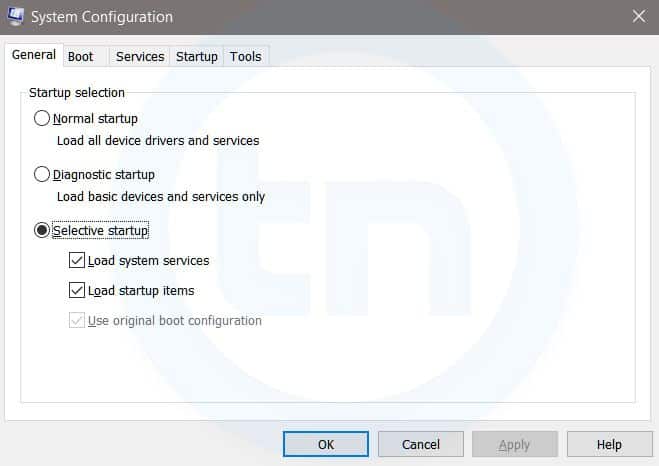
Windows Run Command - MSconfig-compressed
Windows System Configuration
This command will open Windows System Configuration where you can edit different things like the boot options, startup options, services, etc.
4. sysdm.cpl
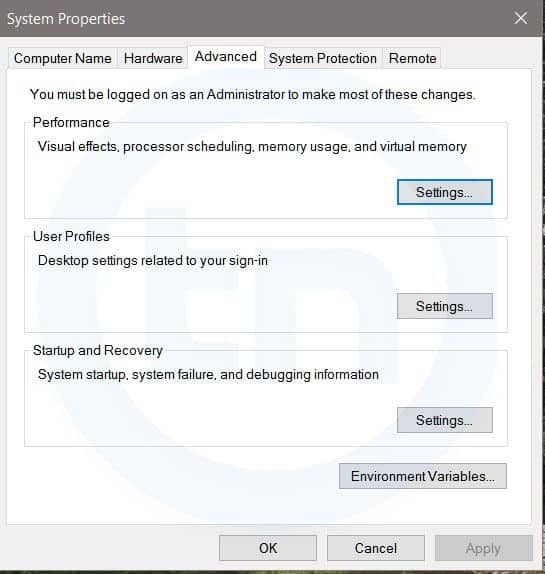
Windows Run Command - sysdm cpl-compressed
System Properties window
This command will open the System Properties window, Where you can change the system protection and performance related many settings
5. Powershell
Powershell is very similar the command prompt. Just type this command in the Run dialog box, and you will have your PowerShell opened without administrator privileges.
6. perfmon.msc
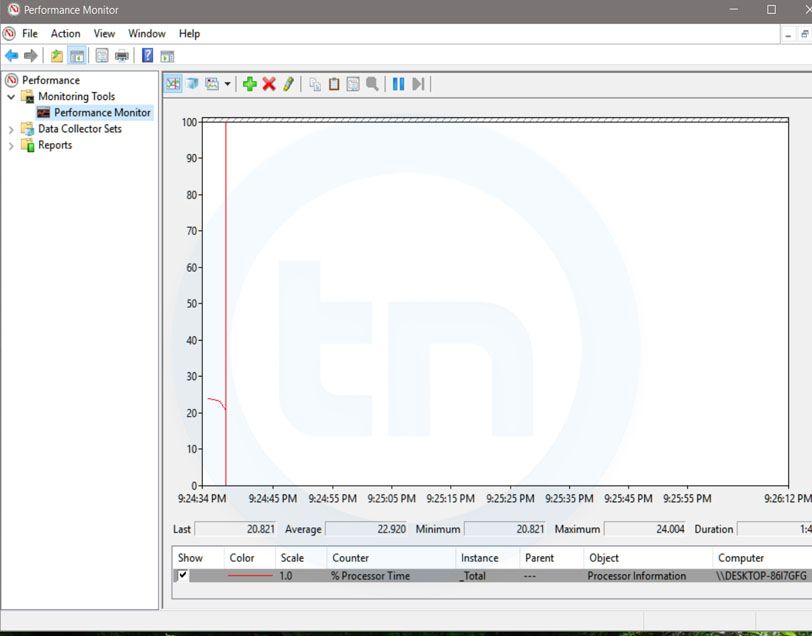
Windows Run Command - perfmon msc-compressed
Windows System Performance monitor
This command can be used to monitor the performance of your computer. There are plenty of options for monitoring the system performance
7. regedit
Regedit Run command is used to open the Windows Registry. It is a hierarchical database that hosts all the configurations and settings of Windows operating system, it's users and the installed software.
8. \ (Backslash)
This is one of the lesser known Run commands. Just enter the backslash into the Run dialog box and it will open up the C drive. It is one of the quickest ways to access the C drive.
9. . (Dot)
This is yet another lesser known Run command. When executed, it opens the current user's home folder which hosts all the other local folders like the Downloads, Documents, Desktop, Pictures, etc.
10. .. (Double Dots)
When you execute these two dots in the Run dialog box, it will open up the Users folder which is located directly on the C drive
11. Control
This command will open the control panel. Control panel is used for managing all the system settings and programs
12. hdwwiz.cpl
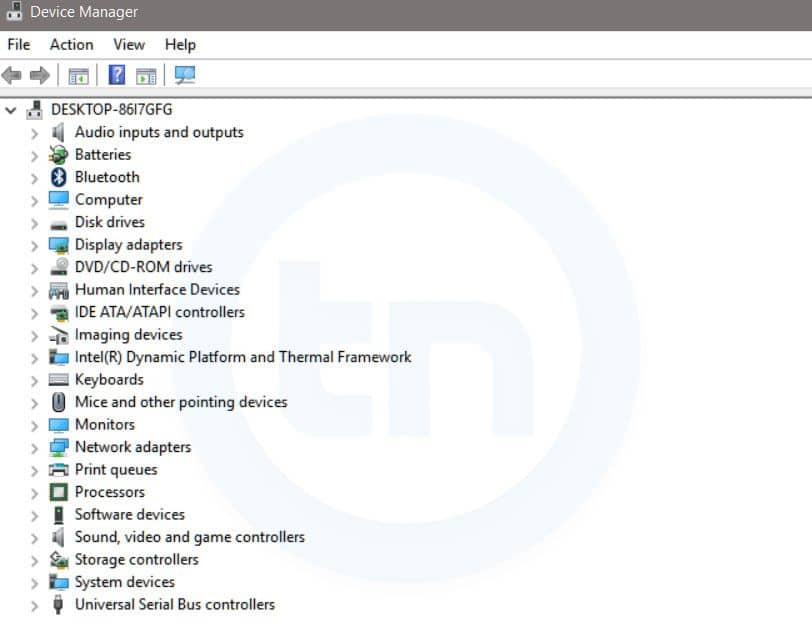
Windows Run Command - hdwwiz-
Windows Device Manager
This command is used to open the Device Manager in Windows. You can manage all the device connected internally or externally to your PC.
13. Notepad
The quickest way to open notepad in Windows. Just type this command in Run Box and hit enter.
14. osk
This command will open On-Screen Keyboard on your display monitor. You can easily touch and type or use your mouse for typing.
15. taskmgr 
This command will open task manager where you can manage all the processes and programs running on Windows Operating system.

More info


  1. Hacking Network
  2. Hacker Kevin Mitnick
  3. Pentest Aws
  4. Pentestmonkey Sql Injection
  5. Pentest Box
  6. Pentest Security

6/04/2020

How To Install Metasploit In Termux

Related links

Blockchain Exploitation Labs - Part 3 Exploiting Integer Overflows And Underflows


In part 1 and 2 we covered re-entrancy and authorization attack scenarios within the Ethereum smart contract environment. In this blog we will cover integer attacks against blockchain decentralized applications (DAPs) coded in Solidity.

Integer Attack Explanation:

An integer overflow and underflow happens when a check on a value is used with an unsigned integer, which either adds or subtracts beyond the limits the variable can hold. If you remember back to your computer science class each variable type can hold up to a certain value length. You will also remember some variable types only hold positive numbers while others hold positive and negative numbers.

If you go outside of the constraints of the number type you are using it may handle things in different ways such as an error condition or perhaps cutting the number off at the maximum or minimum value.

In the Solidity language for Ethereum when we reach values past what our variable can hold it in turn wraps back around to a number it understands. So for example if we have a variable that can only hold a 2 digit number when we hit 99 and go past it, we will end up with 00. Inversely if we had 00 and we subtracted 1 we would end up with 99.


Normally in your math class the following would be true:

99 + 1 = 100
00 - 1 = -1


In solidity with unsigned numbers the following is true:

99 + 1 = 00
00 - 1 = 99


So the issue lies with the assumption that a number will fail or provide a correct value in mathematical calculations when indeed it does not. So comparing a variable with a require statement is not sufficiently accurate after performing a mathematical operation that does not check for safe values.

That comparison may very well be comparing the output of an over/under flowed value and be completely meaningless. The Require statement may return true, but not based on the actual intended mathematical value. This in turn will lead to an action performed which is beneficial to the attacker for example checking a low value required for a funds validation but then receiving a very high value sent to the attacker after the initial check. Lets go through a few examples.

Simple Example:

Lets say we have the following Require check as an example:
require(balance - withdraw_amount > 0) ;


Now the above statement seems reasonable, if the users balance minus the withdrawal amount is less than 0 then obviously they don't have the money for this transaction correct?

This transaction should fail and produce an error because not enough funds are held within the account for the transaction. But what if we have 5 dollars and we withdraw 6 dollars using the scenario above where we can hold 2 digits with an unsigned integer?

Let's do some math.
5 - 6 = 99

Last I checked 99 is greater than 0 which poses an interesting problem. Our check says we are good to go, but our account balance isn't large enough to cover the transaction. The check will pass because the underflow creates the wrong value which is greater than 0 and more funds then the user has will be transferred out of the account.

Because the following math returns true:
 require(99 > 0) 

Withdraw Function Vulnerable to an UnderFlow:

The below example snippet of code illustrates a withdraw function with an underflow vulnerability:

function withdraw(uint _amount){

    require(balances[msg.sender] - _amount > 0);
    msg.sender.transfer(_amount);
    balances[msg.sender] -= _amount;

}


In this example the require line checks that the balance is greater then 0 after subtracting the _amount but if the _amount is greater than the balance it will underflow to a value above 0 even though it should fail with a negative number as its true value.

require(balances[msg.sender] - _amount > 0);


It will then send the value of the _amount variable to the recipient without any further checks:

msg.sender.transfer(_amount);

Followed by possibly increasing the value of the senders account with an underflow condition even though it should have been reduced:

balances[msg.sender] -= _amount;


Depending how the Require check and transfer functions are coded the attacker may not lose any funds at all but be able to transfer out large sums of money to other accounts under his control simply by underflowing the require statements which checks the account balance before transferring funds each time.

Transfer Function Vulnerable to a Batch Overflow:

Overflow conditions often happen in situations where you are sending a batched amount of values to recipients. If you are doing an airdrop and have 200 users who are each receiving a large sum of tokens but you check the total sum of all users tokens against the total funds it may trigger an overflow. The logic would compare a smaller value to the total tokens and think you have enough to cover the transaction for example if your integer can only hold 5 digits in length or 00,000 what would happen in the below scenario?


You have 10,000 tokens in your account
You are sending 200 users 499 tokens each
Your total sent is 200*499 or 99,800

The above scenario would fail as it should since we have 10,000 tokens and want to send a total of 99,800. But what if we send 500 tokens each? Lets do some more math and see how that changes the outcome.


You have 10,000 tokens in your account
You are sending 200 users 500 tokens each
Your total sent is 200*500 or 100,000
New total is actually 0

This new scenario produces a total that is actually 0 even though each users amount is 500 tokens which may cause issues if a require statement is not handled with safe functions which stop an overflow of a require statement.


Lets take our new numbers and plug them into the below code and see what happens:

1. uint total = _users.length * _tokens;
2. require(balances[msg.sender] >= total);
3. balances[msg.sender] = balances[msg.sender] -total;

4. for(uint i=0; i < users.length; i++){ 

5.       balances[_users[i]] = balances[_users[i]] + _value;


Same statements substituting the variables for our scenarios values:

1. uint total = _200 * 500;
2. require(10,000 >= 0);
3. balances[msg.sender] = 10,000 - 0;

4. for(uint i=0; i < 500; i++){ 

5.      balances[_recievers[i]] = balances[_recievers[i]] + 500;


Batch Overflow Code Explanation:

1: The total variable is 100,000 which becomes 0 due to the 5 digit limit overflow when a 6th digit is hit at 99,999 + 1 = 0. So total now becomes 0.

2: This line checks if the users balance is high enough to cover the total value to be sent which in this case is 0 so 10,000 is more then enough to cover a 0 total and this check passes due to the overflow.

3: This line deducts the total from the senders balance which does nothing since the total of 10,000 - 0 is 10,000.  The sender has lost no funds.

4-5: This loop iterates over the 200 users who each get 500 tokens and updates the balances of each user individually using the real value of 500 as this does not trigger an overflow condition. Thus sending out 100,000 tokens without reducing the senders balance or triggering an error due to lack of funds. Essentially creating tokens out of thin air.

In this scenario the user retained all of their tokens but was able to distribute 100k tokens across 200 users regardless if they had the proper funds to do so.

Lab Follow Along Time:

We went through what might have been an overwhelming amount of concepts in this chapter regarding over/underflow scenarios now lets do an example lab in the video below to illustrate this point and get a little hands on experience reviewing, writing and exploiting smart contracts. Also note in the blockchain youtube playlist we cover the same concepts from above if you need to hear them rather then read them.

For this lab we will use the Remix browser environment with the current solidity version as of this writing 0.5.12. You can easily adjust the compiler version on Remix to this version as versions update and change frequently.
https://remix.ethereum.org/

Below is a video going through coding your own vulnerable smart contract, the video following that goes through exploiting the code you create and the videos prior to that cover the concepts we covered above:


Download Video Lab Example Code:

Download Sample Code:

//Underflow Example Code: 
//Can you bypass the restriction? 
//--------------------------------------------
 pragma solidity ^0.5.12;

contract Underflow{
     mapping (address =>uint) balances;

     function contribute() public payable{
          balances[msg.sender] = msg.value;  
     }

     function getBalance() view public returns (uint){
          return balances[msg.sender];     
     }

     function transfer(address _reciever, uint _value) public payable{
         require(balances[msg.sender] - _value >= 5);
         balances[msg.sender] = balances[msg.sender] - _value;  

         balances[_reciever] = balances[_reciever] + _value;
     }
    
}

This next video walks through exploiting the code above, preferably hand coded by you into the remix environment. As the best way to learn is to code it yourself and understand each piece:


Conclusion: 

We covered a lot of information at this point and the video series playlist associated with this blog series has additional information and walk throughs. Also other videos as always will be added to this playlist including fixing integer overflows in the code and attacking an actual live Decentralized Blockchain Application. So check out those videos as they are dropped and the current ones, sit back and watch and re-enforce the concepts you learned in this blog and in the previous lab. This is an example from a full set of labs as part of a more comprehensive exploitation course we have been working on.

Related posts